# Swap Tokens on Bio

This is a step-by-step guide on how to swap tokens on the Bio App, using $AUBRAI as an example.&#x20;

**Note:** You’ll need ETH on Base to complete the swap. If you don’t already have ETH on Base, check out our [fiat guide](https://docs.bio.xyz/bio/~/changes/216/descientists/quickstart-guides/buy-bio-ecosystem-tokens) and [bridging guide](https://docs.bio.xyz/bio/~/changes/216/descientists/quickstart-guides/bridge-bio).<br>

1. Navigate to the[ Bio App](https://app.bio.xyz/agents/aubrai) and login to your wallet in the top right corner of the screen. Click the button “login”.

<figure><img src="https://499247139-files.gitbook.io/~/files/v0/b/gitbook-x-prod.appspot.com/o/spaces%2F3ba2jNU6BPQUl4RXgHor%2Fuploads%2F7VgKJ2edp4pczbr1PYpr%2FSCR-20250828-jdaq.png?alt=media&#x26;token=b6067d0a-637c-437f-9493-c90dd65d1ede" alt=""><figcaption></figcaption></figure>

2. Select your wallet provider to connect.

<figure><img src="https://499247139-files.gitbook.io/~/files/v0/b/gitbook-x-prod.appspot.com/o/spaces%2F3ba2jNU6BPQUl4RXgHor%2Fuploads%2Fq92wtjXpIg2aLomoxHaW%2FSCR-20250828-jdod.png?alt=media&#x26;token=c44e327e-c324-47b5-a7f9-65a5164c588a" alt=""><figcaption></figcaption></figure>

3. Navigate to the top menu bar and click "Launchpad".

<figure><img src="https://499247139-files.gitbook.io/~/files/v0/b/gitbook-x-prod.appspot.com/o/spaces%2F3ba2jNU6BPQUl4RXgHor%2Fuploads%2F7coim25ksdnN5jUrftx2%2FSCR-20250828-jcjx.png?alt=media&#x26;token=e9db28c4-c601-4cd5-8a8b-f242d3db5f58" alt=""><figcaption></figcaption></figure>

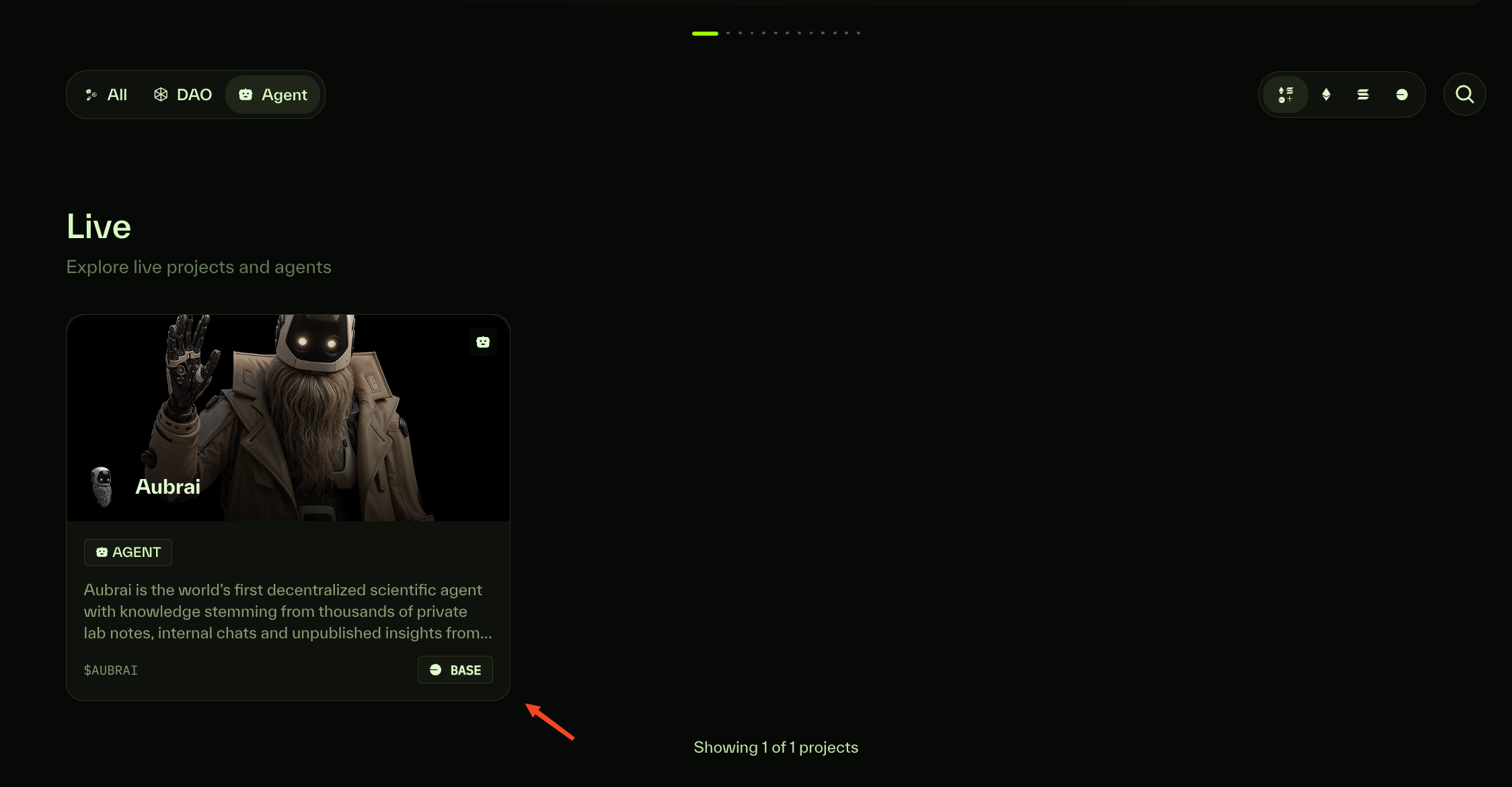
4. Click "Aubrai".

<figure><img src="https://499247139-files.gitbook.io/~/files/v0/b/gitbook-x-prod.appspot.com/o/spaces%2F3ba2jNU6BPQUl4RXgHor%2Fuploads%2F1AyDb3BTsyjOTtYKkFSR%2FSCR-20250828-jgxk.png?alt=media&#x26;token=df8b9341-7247-4f1f-b73b-fd15528d1955" alt=""><figcaption></figcaption></figure>

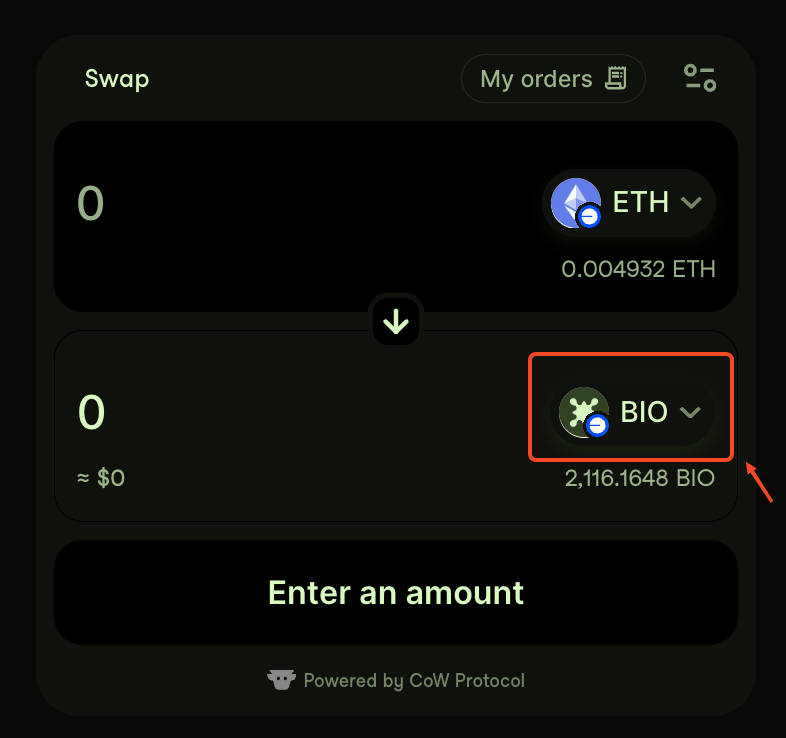
5. Navigate to the swap widget on the page, then click the dropdown arrow next to the token in the lower field.

<figure><img src="https://499247139-files.gitbook.io/~/files/v0/b/gitbook-x-prod.appspot.com/o/spaces%2F3ba2jNU6BPQUl4RXgHor%2Fuploads%2FykPsznDXENIIxyS1oEt7%2FSCR-20250828-jnqi.png?alt=media&#x26;token=e5244eb0-69a4-4946-a23e-4ea75dccba6d" alt="" width="375"><figcaption></figcaption></figure>

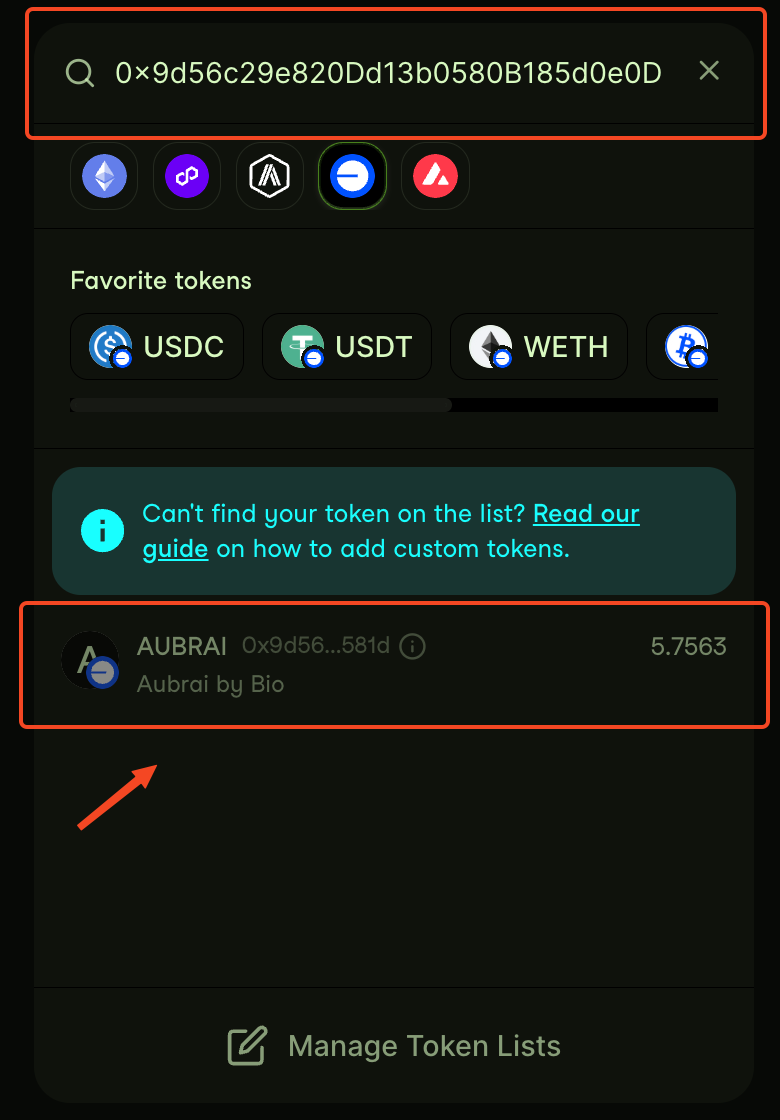
6. Paste the AUBRAI contract address into the search bar and press enter.

<figure><img src="https://499247139-files.gitbook.io/~/files/v0/b/gitbook-x-prod.appspot.com/o/spaces%2F3ba2jNU6BPQUl4RXgHor%2Fuploads%2FrKRPPj57A5hRP8dUSxDZ%2FSCR-20250828-jmfm.png?alt=media&#x26;token=3969077d-3a4a-45d0-8990-7f5354a2bb18" alt="" width="375"><figcaption></figcaption></figure>

7. Enter the amount you want to swap, then click "Allow CoW Swap to use your BIO".

<figure><img src="https://499247139-files.gitbook.io/~/files/v0/b/gitbook-x-prod.appspot.com/o/spaces%2F3ba2jNU6BPQUl4RXgHor%2Fuploads%2F4qSj42ktyDRHFE3ZA0DJ%2FSCR-20250828-jtbj.png?alt=media&#x26;token=95b1a119-2dc1-4227-ab01-f22c5d67e9ff" alt="" width="375"><figcaption></figcaption></figure>

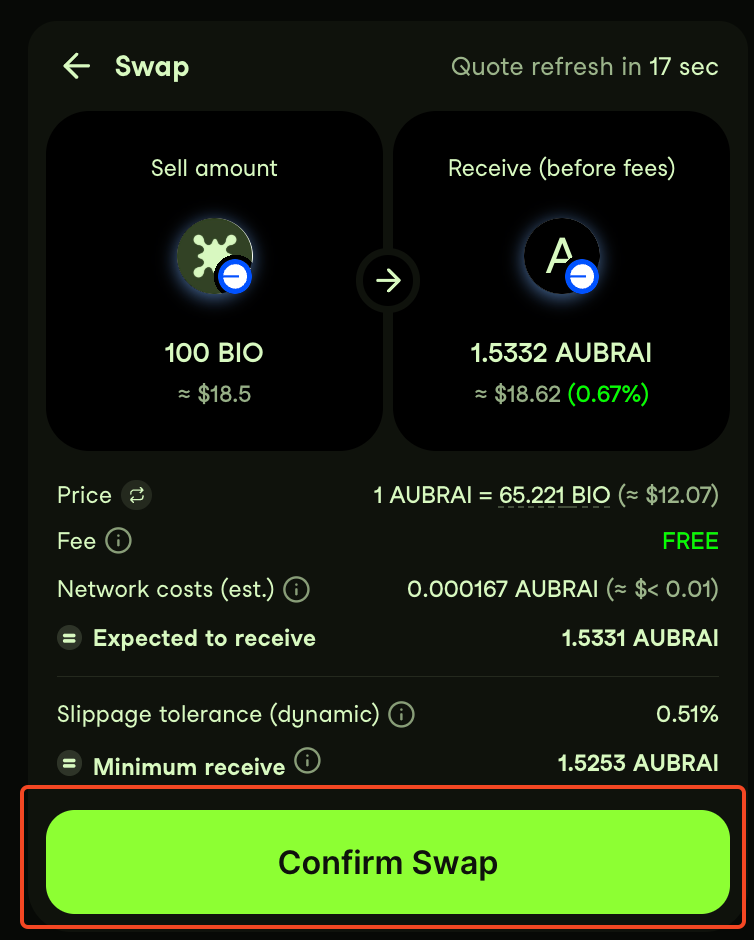
7. Confirm your transaction and click "Confirm Swap".

<figure><img src="https://499247139-files.gitbook.io/~/files/v0/b/gitbook-x-prod.appspot.com/o/spaces%2F3ba2jNU6BPQUl4RXgHor%2Fuploads%2F91aAOpuwGZpcst422vyw%2FSCR-20250828-jufm.png?alt=media&#x26;token=b03d8b9b-0de7-4a43-8020-90fdf2b2ba1a" alt="" width="375"><figcaption></figcaption></figure>

8. You've successfully swapped into $AUBRAI.

<figure><img src="https://499247139-files.gitbook.io/~/files/v0/b/gitbook-x-prod.appspot.com/o/spaces%2F3ba2jNU6BPQUl4RXgHor%2Fuploads%2F3liRz8KKd6HIRADv9Uei%2FScreenshot%202025-08-28%20at%2010.43.15.png?alt=media&#x26;token=86f41181-1b12-48a0-8667-20ae047d3de8" alt="" width="367"><figcaption></figcaption></figure>